
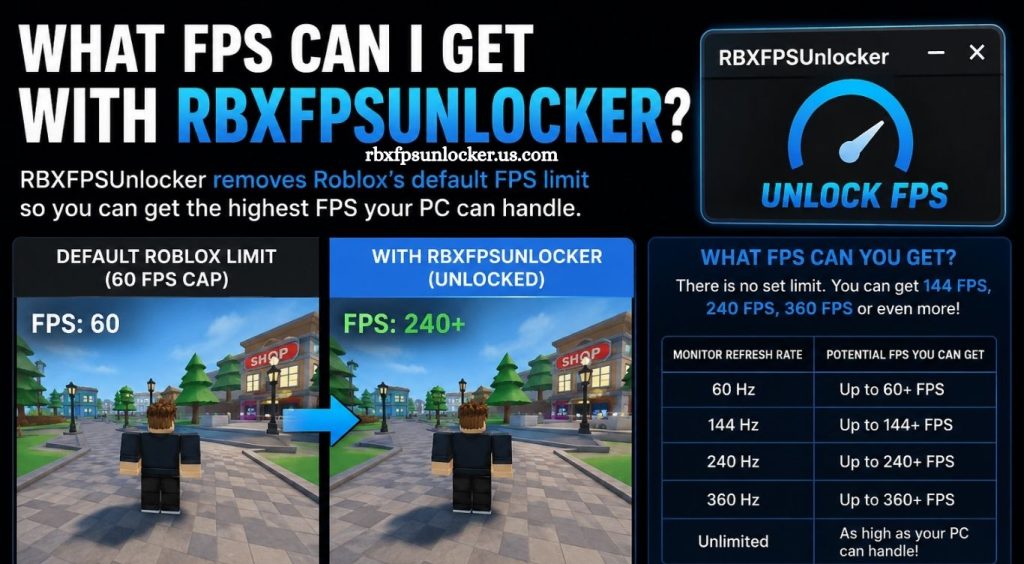
Smooth gameplay can make a major difference in fast-paced Roblox experiences. Frame rate affects how fluid camera movement feels, how quickly visuals respond to player input, and how consistent gameplay appears during demanding scenes. Many PC players explore tools such as RBXFPSUnlocker to move beyond Roblox’s traditional frame-rate limitation and make better use of capable hardware.
RBXFPSUnlocker has become popular among Roblox players looking for higher frame rates without changing the game’s core graphics. Actual performance varies widely based on the computer, Roblox experience, resolution, graphics settings, background applications, and display refresh rate. Understanding these factors helps players set realistic FPS expectations and choose settings that deliver smoother gameplay.
What Is RBXFPSUnlocker?
RBXFPSUnlocker is a Windows utility designed to remove or raise Roblox’s default FPS limitation. Roblox historically operated with a lower frame-rate cap, while modern versions of the platform can support higher frame rates through built-in settings and compatible configurations.
Read More: Is RBXFPSUnlocker safe?
The tool does not automatically make a computer more powerful. Instead, it allows Roblox to render frames at a higher rate when the system can handle the additional workload.
How Much FPS Can RBXFPSUnlocker Provide?
There is no single FPS number that applies to every player. A gaming PC with a modern processor and graphics card may reach several hundred FPS in lightweight Roblox experiences, while an entry-level laptop may remain closer to 60–120 FPS.
Typical results can vary considerably:
| Hardware Level | Possible FPS Range |
|---|---|
| Basic laptop | 60–100 FPS |
| Entry-level gaming PC | 80–150 FPS |
| Mid-range gaming PC | 120–240 FPS |
| High-end gaming PC | 200–500+ FPS |
These figures represent general performance possibilities rather than guaranteed results. Roblox experiences have different levels of optimization, meaning the same computer can produce very different FPS results across different games.
Does RBXFPSUnlocker Increase FPS?
RBXFPSUnlocker can allow Roblox to run above a previous frame-rate limit, but it does not directly increase the computer’s processing power. If your system already reaches 60 FPS because of a frame cap, unlocking the limit may allow 100, 144, 240, or more FPS when sufficient hardware performance is available.
For example, a computer capable of rendering 180 FPS may remain at 60 FPS under a restrictive cap. Removing that restriction allows the hardware to produce more frames.
What Determines Roblox FPS?
CPU Performance
The processor plays an important role in Roblox performance. Many experiences rely heavily on CPU calculations, especially games containing large maps, numerous players, physics effects, and complex scripts.
A stronger CPU can help maintain higher frame rates, particularly in CPU-heavy Roblox experiences.
GPU Performance
The graphics processor becomes increasingly important when Roblox is running at higher resolutions or graphics settings. Higher graphical detail creates additional rendering work, which can reduce FPS.
Players using powerful GPUs may achieve high frame rates at 1080p, while demanding settings at 1440p or 4K can produce lower results.
Roblox Experience Optimization
Roblox FPS depends heavily on the specific experience being played. A simple game with limited objects may run at several hundred FPS, while a large open-world experience with detailed environments and numerous effects may struggle to maintain 60–120 FPS.
This makes experience optimization one of the biggest variables when comparing FPS results.
Graphics Settings
Roblox graphics settings directly affect rendering workload. Increasing graphics quality can improve visual detail while reducing performance.
Lowering graphics quality may help achieve higher and more stable FPS, particularly on weaker systems.
Background Applications
Browsers, recording software, launchers, overlays, and other applications can consume CPU, GPU, and RAM resources. Closing unnecessary applications can provide additional performance headroom.
Can You Get 144 FPS With RBXFPSUnlocker?
Yes, 144 FPS is achievable on suitable hardware. A gaming PC with adequate CPU and GPU performance can often reach or exceed 144 FPS in less demanding Roblox experiences.
A 144Hz monitor can make this target especially useful because the display can refresh up to 144 times per second. Running Roblox around 144 FPS can provide noticeably smoother motion compared with 60 FPS.
However, demanding experiences may prevent a system from maintaining 144 FPS consistently.
Can You Get 240 FPS?
High-end hardware can potentially reach 240 FPS in Roblox, particularly in lightweight experiences. Achieving a stable 240 FPS requires more than simply unlocking the frame rate.
A powerful CPU, capable GPU, suitable cooling, and optimized software environment can all contribute to higher performance.
A 240Hz monitor also provides a practical reason to target this frame rate. Without a high-refresh-rate display, the visible benefit of extremely high FPS becomes more limited.
Why Does FPS Sometimes Drop After Unlocking It?
Unlocking FPS does not guarantee consistent performance. Roblox may still experience frame-time spikes caused by heavy scripts, large player counts, physics calculations, graphics rendering, or asset loading.
Thermal throttling can also reduce performance. When a CPU or GPU becomes too hot, the system may lower operating speeds to control temperatures.
Memory usage and background processes can create additional fluctuations.
How to Get Higher FPS in Roblox
Start by checking your current hardware performance and monitor refresh rate. Set Roblox graphics quality to a level your system can maintain consistently rather than choosing maximum settings automatically.
Keep graphics drivers updated and close unnecessary background applications before launching Roblox. Windows power settings can also affect performance on laptops and some desktop systems.
A clean cooling system is equally important. Dust buildup, poor airflow, or high temperatures can reduce sustained CPU and GPU performance.
Is Higher FPS Always Better?
Higher FPS generally creates smoother motion and lower frame-time intervals, but the improvement depends on the display and game.
Moving from 30 FPS to 60 FPS is a major improvement. Increasing from 60 FPS to 120 or 144 FPS can provide another noticeable improvement, particularly on high-refresh-rate displays. The difference between 240 FPS and 360 FPS is smaller for many players.
Stable frame rates can also be preferable to highly variable FPS. Consistent performance often feels smoother than constantly fluctuating frame rates.
RBXFPSUnlocker and Monitor Refresh Rate
Your monitor determines how many frames can be displayed each second. A 60Hz monitor refreshes 60 times per second, while 120Hz, 144Hz, 240Hz, and 360Hz displays support progressively higher refresh rates.
Running Roblox at 300 FPS on a 60Hz monitor does not mean the monitor can display 300 complete refreshes every second. Higher FPS can still reduce frame-time intervals, but the visible advantage is limited by the display’s refresh capability.
Conclusion
RBXFPSUnlocker can remove a frame-rate restriction and allow capable PCs to produce significantly higher FPS in Roblox. Actual results depend on hardware strength, Roblox experience optimization, graphics settings, resolution, temperatures, and background workloads.
Pingback: Does RBXFPSUnlocker reduce lag in Roblox? - rbxfpsunlocker