
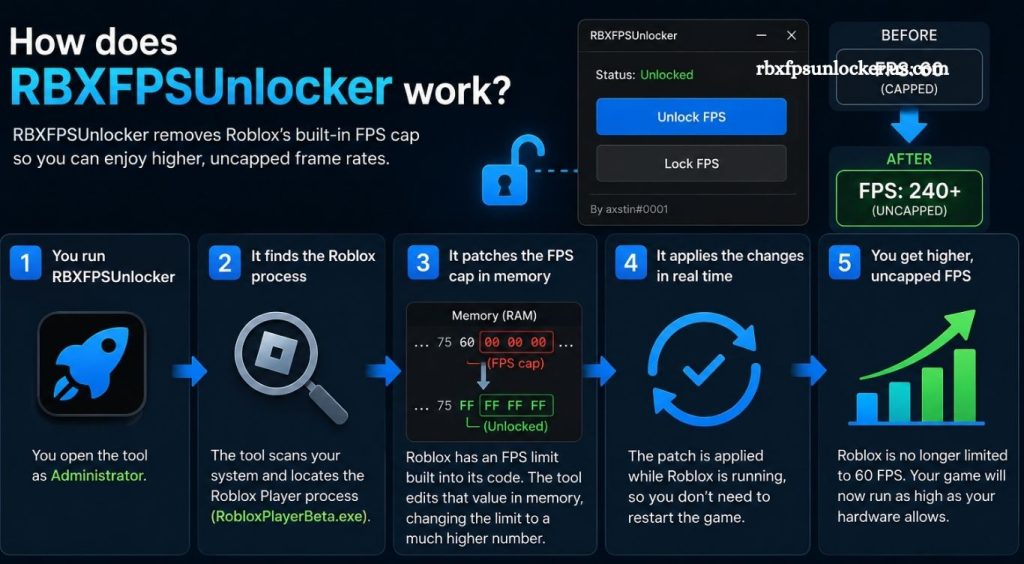
Roblox has become one of the most popular gaming platforms, offering thousands of experiences across different genres. Smooth performance plays an important role in making these games enjoyable, especially for players using powerful gaming PCs. Frame rate can affect how responsive movement feels, how quickly actions appear on screen, and how fluid gameplay looks.
RBXFPSUnlocker is a third-party utility designed for Roblox players who want greater control over the game’s frame-rate behavior. Understanding its purpose, operation, compatibility, and potential limitations can help players decide whether such a tool fits their setup.
What Is RBXFPSUnlocker?
RBXFPSUnlocker, commonly associated with Roblox FPS Unlocker tools, is a utility created to modify Roblox’s frame-rate limitation on compatible desktop systems. Roblox traditionally applies a frame-rate cap, while modern gaming monitors can support refresh rates significantly higher than the standard limit.
Read More: Is RBXFPSUnlocker free to use?
The utility works alongside the Roblox client rather than functioning as a separate game. Its primary purpose is to allow Roblox to render frames at a higher rate when the computer hardware and display can support it.
How Does RBXFPSUnlocker Work?
RBXFPSUnlocker works by interacting with the running Roblox client and changing the frame-rate limitation applied by the game. Instead of forcing Roblox to remain at its default frame-rate ceiling, the utility allows a selected FPS value to be used.
For example, a player with a 144Hz, 165Hz, 240Hz, or higher-refresh-rate monitor may benefit from a frame rate that better matches the display.
The basic process involves launching Roblox, starting the FPS unlocker, and selecting or applying an appropriate frame-rate limit. The utility then monitors the Roblox process and applies the configured setting.
Why Players Use RBXFPSUnlocker
Higher frame rates can make gameplay appear smoother, particularly when a computer can consistently maintain a high FPS level. Camera movement may look more fluid, while mouse input and visual feedback can feel more responsive.
The difference becomes more noticeable when the monitor has a high refresh rate. A 144Hz monitor, for instance, can display substantially more updates per second than a traditional 60Hz display.
However, higher FPS does not automatically improve every aspect of Roblox gameplay. Performance still depends on the processor, graphics hardware, memory, game optimization, temperature, and background applications.
RBXFPSUnlocker and Roblox FPS
Roblox performance varies considerably between experiences. A lightweight game may run at a very high frame rate, while a detailed experience containing complex environments, lighting effects, scripts, and large numbers of players can place much greater demands on the system.
RBXFPSUnlocker changes the frame-rate limit rather than magically increasing the computer’s rendering capability. If a PC can only produce 90 FPS, setting an unlocker to 240 FPS will not necessarily result in 240 actual frames per second.
This distinction is important when configuring the tool.
Does RBXFPSUnlocker Increase Performance?
RBXFPSUnlocker primarily removes or changes a frame-rate restriction. It does not upgrade the CPU, GPU, RAM, or other hardware components.
Players may see higher FPS after using the utility if Roblox was previously restricted by its frame-rate cap. Actual performance depends on the system’s ability to render additional frames.
A useful approach is to select a frame-rate target that matches the monitor and remains stable during gameplay rather than choosing an unnecessarily high number.
Benefits of Using an FPS Unlocker
A higher frame rate can provide smoother visual motion and improved responsiveness on capable systems. Players with high-refresh-rate displays may notice the difference more clearly.
Competitive Roblox experiences can also benefit from consistent frame delivery. Smooth camera movement and reduced perceived input delay can make controls feel more responsive.
Another advantage is flexibility. Instead of being restricted to a single frame-rate target, users can configure an appropriate limit according to their hardware and display.
Possible Drawbacks
Running Roblox at a higher frame rate can increase CPU and GPU usage. Higher hardware utilization may produce additional heat, increase power consumption, and cause fans to operate more frequently.
Unstable frame rates can also create a less consistent experience. A system fluctuating heavily between high and low FPS may feel worse than one maintaining a lower but stable frame rate.
Compatibility can present another issue. Roblox updates may change the way the client operates, potentially affecting third-party utilities that interact with it.
Is RBXFPSUnlocker Safe?
Safety depends heavily on the specific FPS unlocker version and its source. Third-party Roblox utilities should be obtained only from reputable, verifiable sources. Unofficial download pages can bundle unwanted software, modified executables, or malware.
Players should also understand that third-party tools are separate from Roblox itself. Before using any utility that interacts with the Roblox client, users should review Roblox’s current rules and the tool’s reputation.
Avoid downloading an FPS unlocker from suspicious websites, file-sharing pages, or unknown links.
Can RBXFPSUnlocker Cause Lag?
An FPS unlocker itself does not necessarily cause network lag because FPS and internet latency are different factors. FPS represents how quickly the computer renders frames, while network latency relates to communication between the device and game servers.
However, pushing hardware beyond comfortable limits can create thermal throttling or inconsistent performance. In such situations, gameplay may appear less smooth even though the FPS counter shows a high number.
Best FPS Setting for Roblox
The best setting depends on the player’s monitor and hardware. A sensible target is usually one that the computer can maintain consistently.
For a 60Hz display, extremely high FPS may provide limited visual benefit. Players using 120Hz, 144Hz, 165Hz, 240Hz, or higher-refresh-rate monitors may have more reason to experiment with higher limits.
Testing different settings can help identify the balance between smooth gameplay, system temperature, and stability.
RBXFPSUnlocker vs Roblox’s Built-In Settings
Roblox has increasingly provided more control over graphics and performance through its own settings and platform updates. A third-party FPS unlocker is different because it specifically targets frame-rate limitations rather than general graphical quality.
Players should prioritize Roblox’s native options whenever they meet their performance requirements. Third-party software should be considered only when there is a clear need and the tool remains compatible with the current Roblox client.
Troubleshooting RBXFPSUnlocker
If an FPS unlocker does not work, the first step is checking whether the Roblox client has recently changed. Updates can affect compatibility with third-party utilities.
Restarting Roblox and the utility can resolve temporary detection issues. Checking whether another program is interfering with the Roblox process can also help.
Players should avoid downloading random replacement executables simply because an existing version stops working. An unofficial replacement can introduce security risks.
Conclusion
RBXFPSUnlocker can help Roblox players achieve higher frame rates by adjusting the game’s default FPS limitation. Its benefits are most noticeable on capable PCs paired with high-refresh-rate monitors. However, results depend on hardware, game optimization, and software compatibility. Players should use trusted sources, choose stable FPS settings, and check Roblox’s current policies before using third-party utilities.
Pingback: Can RBXFPSUnlocker increase Roblox FPS? - rbxfpsunlocker